Related Sites

Showing posts with label Facebook. Show all posts

Experience Facebook in a Different way, Personalize Your Facebook Log In Background

Are you bored with Facebook conventional look?, especially when logging on the site, it is kinda boring to have the it same look all over again. So why not change it, if your a Google Chrome or any Chrome web browser user will you have the choice to change and personalize your Log in background and have all new experience in enjoying Facebook.

Ladies and gentlemen I introduce you FB Refresh, this is chrome extension has been on the web long before  but  few enjoyed it because of lots bug on the extension, but the creators of this extension have developed new version which fixes those bugs that limiting people to enjoy FB Refresh.

Here is how to use FB refresh, but again this works only if you are Chrome Web Browser user.

  1. First thing to do is install the extension for free by going to Chrome Store or by just clicking this link FB Refresh
  2. Then  click Add to Chrome


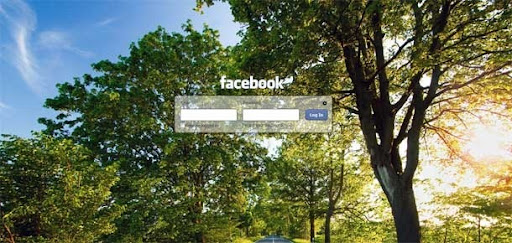
      3. After you install the extension go to www.facebook.com and if your already log in on the site better    log-out to see the new look. And you will see the default background like this.
Hated The New Facebook look, Change it Back!

Did you just opened your Facebook account just this very time?, and notices that there are some changes on the site. If this changes sucks and too annoying for you my friend and wishing to have the old Facebook look you used to worry no more my friend cause there is a solution for that. 


Here's how my friend.
         First you need to scroll down until you find the  Facebook © 2011 · English (US)


             Just click on the English (US) and change it from (US) to (UK)

            And you just got your old Facebook account, hope this post help you on changing back your old Facebook. Leave a comment if you have some queries and comments.

Google+ Most Followed Profile, Mark Zuckerberg Tops?


Compared to Facebook, Google+ is still considered an infant in terms of site users, but in recent months the popularity of Google plus among the people are increasing. In a recent surveys many people are now willing to leave their Facebook account for Google+.

Google+ has been on the web since 2009, there are only 18 million users through out the globe which is few compared to Facebook's 750 million active users. One reason why Google+ have few users despite of its awesome features and almost 2 years of existence is maybe because of its exclusiveness, you wouldn't able to create an account in Google+ if your not invited, one must have an invitation from a friend which is already on Google+.


But here is an ironic fact, the social network recently released its statistic report, according to Google+ statistics the most popular person or the person most followed is none other than Mark Zuckerberg. Yes, you know Mark Zuckerberg founder/ CEO of Facebook , he has 379,382 followers putting him ahead of Google's founders Larry Page ang Segrey Brin. Ahh the irony.


Simple Facebook Trick You must Know.

A lot of people are now engage in Facebook. Spending a lot of their free time on Facebook, if you're one of those why not maximize your Facebook experience with this comprehensive list of keyboard shortcuts. Just be familiar with it and be more efficient with while spending your time on Facebook, no more scrolling and clicking, just press one or two keys and the task is done.

To use this shortcuts you must identify first what web browser you're using. Here is the list of shortcuts.


For Google Chrome Users
Alt+1: View your News Feed
Alt+2: View your own Profile
Alt+3: View pop-up of friend requests
Alt+4: View pop-up of messages
Alt+5: View pop-up of notifications
Alt+6: View Account Settings
Alt+7: View Privacy Settings
Alt+8: View Facebook’s own profile
Alt+9: Read latest Terms of Service agreement.
Alt+?: Search
Alt+m: Compose a new message


Update Your Facebook Status with Emojis!

Do you love posting your status on Facebook? Or are you looking ways to make your  post status update to look more cooler on Facebook? This might be the one  the one you're looking for, update your Facebook status with Emoji or animated smiley and emoticons. 

Update your Facebook status with this cute Emojis. Choose for a variety of cute icons to get more personal touches with your status updates.

With this Emoji's you'll be changing your Facebook experience to ordinary from extraordinary! I don't want to excite you more, so here's how to use this Emoji's and start updating your status in a cooler way.


Instructions:
  1. Go to this app http://apps.facebook.com/chcepeemoji/ be sure your to log in Facebook.
  2. On the app type whatever you want on the box and select your desired Emoji.
  3. After typing and selecting, copy what you type on the box and click Update Status above the app.
  4. You are then redirected to Facebook wall post and paste your status in the box and click Share.
  5. Exit the window and go to your Facebook homepage and boom you have updated your status with cool Emojis.
Like this post click +1 and click the facebook like botton to share it with your friends.

Google+ to beat Facebook?

Google Inc., its all over the web, how many site you know that has been incorporated with this behemoth. So there is   Gmail, Google Adsense, Google Adword, Youtube and etc, indeed this branches of Google caters the need to have a great web experience for all the people across the globe. But there is still missing, Hmmm wonder what is it? It might be Mark Zuckerberg's worst nightmare, yeah you know him owner of Facebook and the youngest billionaire, Google now is launching the missing piece of the puzzle to give the best web experience to its users.


Guys and Gals are you excited? You must be because Google+ Project  is finally here! What to excite with Google+?, basically it has the same functionality with Facebook, you can share pictures, videos etc. to your family and friends and with its recently added features Facebook allows video calling to your friends.


Here is what separate Google+ Project to Facebook.


 Google+ Circles. I really like this feature, with Circles you can share thoughts, photo, videos and things that you would like to share only with the  people that you want to share with, unlike with Facebook if you post something on it everybody in your friend's list will be able to know or see what you shared, which is a bit risky if you have people that you actually don't know in your list. With Circles you have the control where or to whom you want to share with just with one click, share only with your family or share only with your friends and your assured that others wont know about it.

Google+Hangouts. So recently Facebook added it's new feature which you can video call your online friends, pretty good I say, but you will love Google+Hangouts because with this feature you can actually video call not only one friend like in Facebook, but you can actually video call your friends up to a staggering of 10 friends at the same time, ain't  that great?


Google+Sparks. Are you into something? I mean really into it, an avid fan of         Sports or a die hard fan of Naruto, with sparks you can have a constant and fast update and feeds of stuffs that captures your interest and share it to your Circles with just a click.


For my opinion Google+ captures the real meaning of the word "sharing" with its nifty features. I hope you like this simple sneak peek of Google, I am also still exploring Google+ and share more about this in the future. If you have comments about this article or topic, feel free to leave a comment, just click the comment tab  on this blog.

Video Calling on Facebook

Have you tried Video chat while on Facebook? Sound new? Well the social networking website behemoth launches its newest feature that allow it's million users to video chat or video call while browsing in Facebook. This was made possible by the site by merging with Skype which is one of the leading Video Calling provider.
And maybe facebook launches this feature because there were rumors that Google another behemoth in Web are soon to launch its own networking site that also allow users to use video calling,  the Google is soon to launch Google+, but that's another story.


I know your itching to use Video calling on Facebook, so here's how to activate this feature.


Step 1: Go to http://www.facebook.com/videocalling
Step 2:  Activate Video calling by hitting or clicking  Get Started


Step 3: Download and install Facebook video calling plug-in. It will just take a minute or few depending on
            your internet connection.
Step 4: After installing the plug-in you are ready to start video calling, just choose the person you wish to have
            a video call and you will see the icon of somewhat a camera.(see screen shots)


Step 5: Enjoy video calling!


Try this now folks and level up your experinece with facebook and have a new world of fun just with just one site. Be the first to know what new in the web be my follower. 
Related Posts Plugin for WordPress, Blogger...